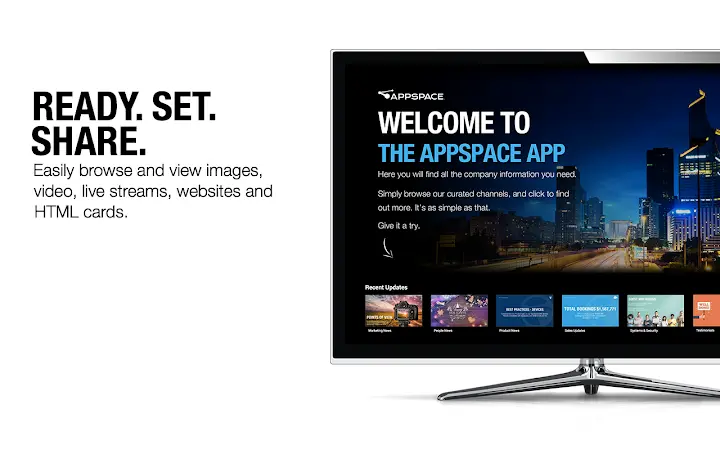

Turn Any Chrome Device into a Digital Signage Player
Overview
The software enables Chrome devices to function as dedicated digital media players for Appspace channels, allowing users to display a wide range of content including images, video files, live streams, websites, and HTML cards. Designed for seamless integration with Appspace’s content management system, the application supports dynamic, visually engaging digital signage across diverse display environments. Its primary purpose is to transform standard Chrome devices into high-performance signage solutions without requiring specialized hardware.
Target users include businesses, educational institutions, retail outlets, and corporate offices seeking cost-effective, scalable digital signage solutions. The software is ideal for organizations already using or planning to adopt Appspace’s platform for centralized content distribution and scheduling. Real-world applications include displaying real-time announcements, promotional videos, event schedules, and live data feeds on screens in lobbies, classrooms, hallways, and retail spaces.
Developed by Appspace, the software aligns with the company’s focus on unified digital workplace solutions. While specific developer background details are not provided, the product reflects Appspace’s established presence in the digital signage and workplace communication space. The software’s reliance on a robust HTML5 engine ensures consistent rendering and smooth playback across supported devices.
Key Features & Capabilities
- Multi-Content Display – Supports images, video files, live streams, websites, and HTML cards, enabling rich, dynamic content delivery across multiple formats.
- HTML5 Engine Integration – Leverages a powerful HTML5 engine for smooth video playback, sharp text rendering, and pixel-perfect content positioning.
- Appspace Channel Compatibility – Seamlessly connects with Appspace channels to deliver scheduled and real-time content without additional configuration.
- Universal Device Support – Functions on any Chrome device, including Chromebooks, Chromeboxes, and Chromebases, reducing hardware dependency.
- Content Synchronization – Automatically updates content from Appspace channels, ensuring all displays show the latest information in real time.
Users can deploy this software to transform a standard Chrome device into a professional-grade digital signage player. For example, a school might use it to display daily schedules, announcements, and live event feeds across classrooms and hallways. A retail store could showcase product promotions, social media feeds, and real-time inventory updates. The ability to render web content and HTML cards allows for interactive displays, such as weather widgets or live news tickers.
User Interface, Workflow & Performance
The user interface is designed for simplicity and efficiency, focusing on minimal setup and automatic content delivery. Navigation is streamlined, with the application launching directly into the assigned Appspace channel. Users do not need to manually manage content files or configure playback settings, as these are handled through the Appspace platform.
Workflow efficiency is enhanced by the integration with Appspace’s content management system. Once a device is registered and assigned to a channel, it begins displaying content automatically. The software runs in the background, minimizing user interaction after initial deployment. This makes it suitable for unattended operation in public or shared spaces.
Performance observations are based on general software behavior patterns. The developer did not specify resource usage details. However, the use of a modern HTML5 engine suggests optimized rendering and efficient memory handling. Stability is expected to be high, given the software’s lightweight nature and integration with a mature content delivery platform.
Compatibility & System Requirements
The software is compatible with Windows, Mac, and ChromeOS operating systems. It is available in version 1.0.0 and has an installation size of 45.2 MB. The application is designed to run on any device that supports ChromeOS or can run Chrome-based applications.
Exact system requirements were not listed. Compatibility information was partially provided, indicating broad support across Chrome devices. The software does not require high-end hardware, making it suitable for older or budget-friendly Chrome devices. The developer did not provide additional system requirements.
Pros and Cons
Pros
- Turns any Chrome device into a functional digital signage player
- Supports a wide variety of content types including live streams and web pages
- High-quality rendering via integrated HTML5 engine
- Seamless integration with Appspace’s content management system
- Free to use with no licensing costs
Cons
- Requires an Appspace account to function
- Limited to Chrome devices and ChromeOS-compatible systems
- Dependent on Appspace’s infrastructure for content delivery
- No standalone mode or offline content management
FAQ Section
Is this software compatible with all Chrome devices?
The software is designed for Chrome devices that support ChromeOS and can run Chrome-based applications. Compatibility may vary based on device model and firmware version.
Can I use this software without an Appspace account?
No. The software requires an active Appspace account to access and display content from Appspace channels.
Is the software secure to use?
As a Chrome-based application developed by Appspace, it adheres to standard security protocols for web applications. The software does not collect user data beyond what is necessary for content delivery.
How often does the software update content?
Content is synchronized in real time with Appspace channels. Updates occur automatically based on the scheduling settings defined in the Appspace platform.
Can I use this software offline?
The software requires an active internet connection to fetch content from Appspace channels. It does not support fully offline content playback.
Final Thoughts
This software provides a powerful, cost-effective solution for organizations seeking to deploy digital signage using existing Chrome devices. Its ability to deliver high-quality, dynamic content through a unified platform makes it a strong choice for businesses, schools, and retailers. While it is limited to Appspace users and requires an internet connection, its seamless integration, broad content support, and free pricing model offer significant value.
For teams looking to enhance communication and engagement through digital displays, this tool offers a streamlined path to implementation. The combination of rich media support, reliable performance, and zero cost makes it a standout option in the digital signage space.
Download Appspace Digital Signage Player now







